
Videos & subtitles
Adjust subtitles for videos
The tutorial videos are usually in Dutch. You can enable subtitles in the video player and change the language to English or French.
Brief overview
Use this explanation when you watch a video and the subtitles are not in the correct language. You adjust this directly in the video player.
The names in the menu usually remain in English. Therefore, look for Closed Captions and Caption Language.
Step-by-step plan
Step 1 - Open the video's settings
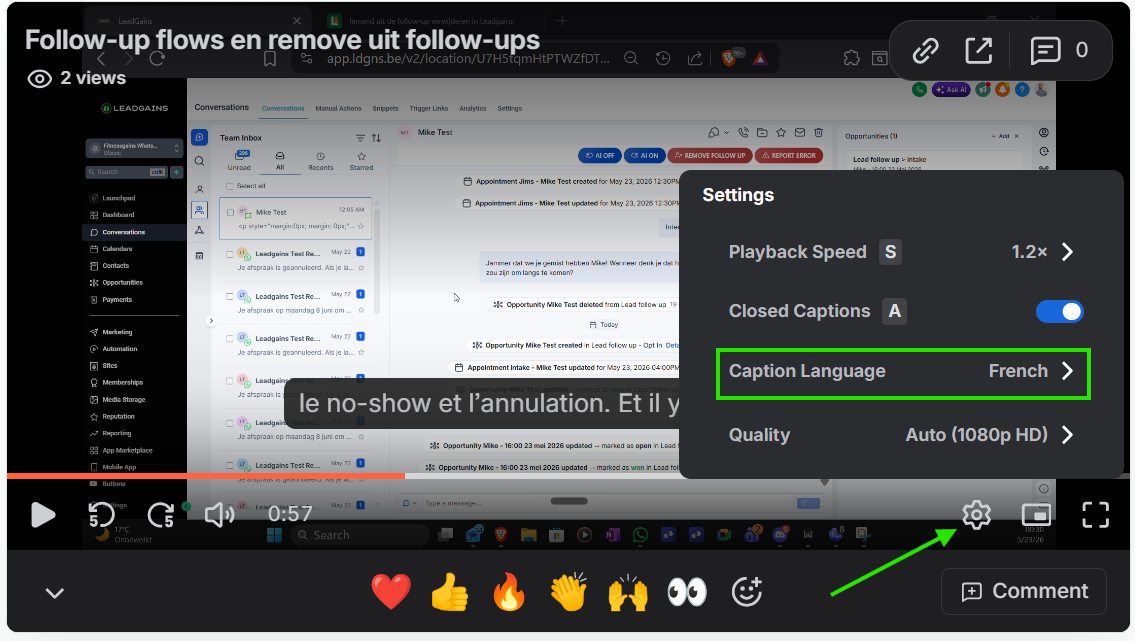
Click on the gear at the bottom right of the video player . Turn on Closed Captions if it is still off.
Step 2 - Choose the language of the subtitles
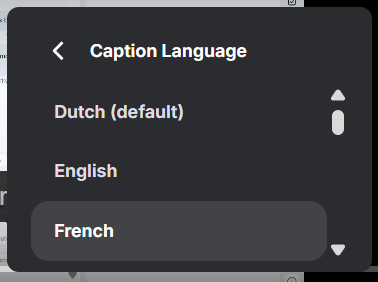
Click Caption Language. Then choose the language in which you want to read the subtitles, for example English or French.
Step 3 - Continue playing the video
Close the menu and continue playing the video. The subtitles will appear at the bottom in the language you have chosen.
Troubleshooting
Check that Closed Captions is turned on. If necessary, restart the video or refresh the page.
Open Caption Language again and scroll the list. Choose English or French if you want translated subtitles for the Dutch video.